
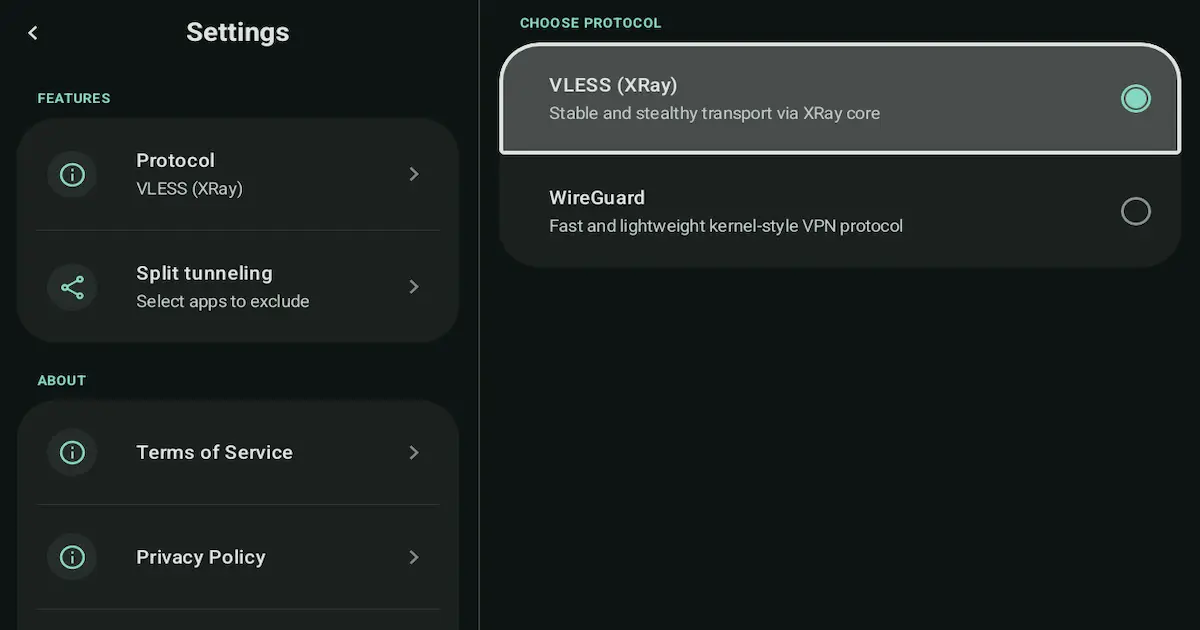
WireGuard vs XRay (VLESS/Reality) on Android: Which One to Use? (2026 Practical Guide)
If your VPN app offers more than one protocol, the natural question is: which one should you use today? The good news is that you do not need to be a networking expert to make a solid choice.
This guide compares WireGuard and XRay (VLESS/Reality) on Android in plain language. You will get a simple mental model, a mini-table, scenario-based recommendations, and a troubleshooting section that tells you what to try by symptom (not by guesswork).
NimbusVPN supports both protocols on Android, plus Split Tunneling and Android TV (remote-friendly), so you can apply the same logic on your phone and your TV box.
Quick Summary
-
WireGuard is often the simplest starting point on normal networks.
-
XRay (VLESS/Reality) can help on restrictive or filtered networks.
-
If you are unsure, test both for 1–2 minutes and keep the one that stays stable.
-
Change one variable at a time (protocol or server or split tunneling list).
-
For app-specific problems, Split Tunneling is often more effective than switching protocols.
-
On Android TV, stability matters most—use a nearby server and a simple setup.
-
NimbusVPN offers WireGuard, XRay (VLESS/Reality), Split Tunneling, and Android TV support.
What a VPN protocol is (simple mental model)
A VPN protocol is the method your VPN uses to create a secure connection between your device and a VPN server. Think of it like choosing a shipping method for a package: the destination is the same, but the route and packaging can differ.
Protocols define how your device and the server:
-
start the connection,
-
verify each other,
-
encrypt data, and
-
keep the tunnel stable over time.
Some protocols are designed to be lightweight and straightforward. Others are designed to be more resilient on networks that try to block or limit VPN traffic. That is why the same VPN app can feel fine at home but broken at a hotel—the network environment changed, not your phone.
The practical takeaway: protocol choice is a stability and compatibility tool, not a magic speed button.
How to choose in 30 seconds
Use this simple rule of thumb:
-
Start with WireGuard for normal networks (home Wi-Fi, regular mobile data, typical cafes).
-
Switch to XRay (VLESS/Reality) when:
- the VPN fails to connect,
- the network seems restrictive, or
- you see frequent disconnects on Wi-Fi you do not control.
If both work, keep the one that feels more stable for that specific network. No protocol is best everywhere.
Mini-table comparison: WireGuard vs XRay (VLESS/Reality)
Mini-summary: use this table as a quick decision helper, then jump to the scenario that matches your situation.
Mini-table comparison (WireGuard vs XRay (VLESS/Reality))
| | WireGuard | XRay (VLESS/Reality) |
|---|---|---|
| Best for | Everyday use on normal networks | Restrictive or filtered networks |
| When to switch | Switch to XRay if it fails to connect or seems blocked | Switch to WireGuard on normal networks for the simplest setup |
| What to expect | Clean setup, usually stable if the network allows it | Better odds on restrictive networks, but still depends on conditions |
| Good pairing with Split Tunneling | Great for VPN-only-for-one-app setups | Useful when the network blocks typical VPN patterns |
Important note: neither protocol guarantees higher speed or access. Your network and server distance still matter.
Scenario recommendations
Mini-summary: pick the scenario that matches your day-to-day. Each one includes a practical starting choice and when to switch.
Home Wi-Fi everyday use
If you are on your own Wi-Fi and everything is normal:
-
Start with WireGuard.
-
Pick a nearby server location.
-
Keep your setup simple:
- VPN on for general privacy, or
- Split Tunneling if you only need VPN for a few apps.
When to switch to XRay (VLESS/Reality):
-
WireGuard fails to connect, or
-
you see repeated drops that do not happen off-VPN.
Public Wi-Fi (hotel/cafe)
Public Wi-Fi is where VPNs are most useful, but also where networks vary a lot.
Start here:
-
Try WireGuard first.
-
If the network has a login page (captive portal), complete it before enabling VPN.
Switch to XRay (VLESS/Reality) if:
-
WireGuard handshake fails, or
-
the connection keeps dropping, or
-
connected shows but apps do not load.
Practical tip: use Split Tunneling if one app fails on VPN rather than turning VPN off entirely.
Restricted or filtered networks
Some networks (schools, offices, managed Wi-Fi) restrict VPN patterns.
Start here:
-
Try XRay (VLESS/Reality) first.
-
Keep server choice nearby to reduce variables.
If it works but feels inconsistent:
- Try WireGuard once (some restrictive networks block one method more than the other).
What to expect:
- Results depend on the network policy. You are aiming for stability, not perfection.
Streaming app issues
If a streaming app loads without VPN but fails with VPN, switching protocols may help—but Split Tunneling is usually the fastest fix.
Start here:
-
Keep your current protocol (WireGuard is fine to start).
-
Use Split Tunneling:
- Exclude the streaming app (streaming direct, everything else on VPN), or
- Include only the apps you want on VPN.
If you still want to test protocols:
-
Try WireGuard first.
-
Switch to XRay (VLESS/Reality) if the network seems restrictive or the app fails only on certain Wi-Fi.
Reminder: do not change server and protocol and split tunneling list at the same time.
Android TV usage
On Android TV, the goal is a remote-friendly workflow and fewer moving parts.
Start here:
-
Use WireGuard on normal home networks.
-
Choose a nearby server.
-
Add Split Tunneling if only one app needs VPN.
Switch to XRay (VLESS/Reality) if:
-
the TV is on restrictive Wi-Fi (hotel, dorm, office), or
-
WireGuard fails to connect.
Tip: if you are troubleshooting, rebooting the TV box often helps clear stuck network states.
Split tunneling setups (how protocol choice interacts)
Split Tunneling decides which apps use the VPN. The protocol decides how the VPN tunnel is built. They solve different problems:
-
Use Split Tunneling for app-level compatibility (one app breaks, banking or streaming sensitivity).
-
Use protocol switching for network-level compatibility (VPN blocked, handshake fails, frequent drops).
Practical pairing rules:
-
If you use Include mode (VPN only for a few apps), start with WireGuard.
-
If you are on a restrictive network and even included apps fail, try XRay (VLESS/Reality).
-
When testing, keep your split tunneling list unchanged and only switch protocol.
Troubleshooting by symptom
Mini-summary: find your symptom, apply 2–4 fixes, and try the suggested protocol first.
1) Handshake fails / cannot connect
Try first: WireGuard, then XRay (VLESS/Reality) on restrictive networks.
Fixes:
-
Confirm internet works without VPN (open a browser).
-
Switch to a nearby server location and retry.
-
Switch protocol (WireGuard ↔ XRay (VLESS/Reality)).
-
Toggle airplane mode on and off (or reboot) to reset networking.
2) Connects, but no internet in any app
Try first: WireGuard.
Fixes:
-
Check Android Date and Time (set to automatic).
-
Disable Private DNS temporarily (if enabled).
-
Disconnect and reconnect the VPN.
-
Try the other protocol if it persists.
3) Slow speeds
Try first: WireGuard.
Fixes:
-
Try another nearby server location.
-
Switch Wi-Fi band (5 GHz) or move closer to the router.
-
Use Split Tunneling: keep only the needed app(s) inside VPN.
-
Switch protocol and compare stability (no guarantees).
4) Frequent disconnects
Try first: WireGuard on normal networks, XRay (VLESS/Reality) on restrictive ones.
Fixes:
-
Reboot the phone (often clears stuck Wi-Fi states).
-
Try a different nearby server location.
-
Switch protocol.
-
On some phones, disable aggressive battery or power saving for the VPN app.
5) Some apps work, some apps fail
Try first: keep current protocol, use Split Tunneling.
Fixes:
-
Exclude the failing app (if most apps should use VPN).
-
Include only the specific app that needs VPN (if you only need it for one app).
-
Clear the failing app cache and retry.
-
If the network is restrictive, test XRay (VLESS/Reality).
6) DNS issues (sites load in one app but not another)
Try first: WireGuard.
Fixes:
-
Disable Private DNS temporarily.
-
Reconnect VPN after changes.
-
Reboot phone.
-
Switch protocol if DNS-like issues persist on one network.
7) Captive portal (hotel Wi-Fi login page)
Try first: protocol does not matter until login is completed.
Fixes:
-
Disconnect VPN.
-
Open a browser and complete the Wi-Fi login page.
-
Confirm internet works normally.
-
Reconnect VPN (WireGuard first; switch if blocked).
8) Battery or power restrictions (VPN pauses in background)
Try first: WireGuard.
Fixes:
-
Set the VPN app battery usage to Unrestricted (if available on your Android version).
-
Disable aggressive power saving modes temporarily.
-
Reconnect the VPN after changing settings.
-
If Wi-Fi is also unstable, try XRay (VLESS/Reality).
9) Banking app shows unusual login prompts or loops
Try first: Split Tunneling, keep protocol stable.
Fixes:
-
Exclude banking apps from VPN (banking direct).
-
Avoid switching servers during login attempts.
-
Clear the banking app cache only if you accept it may reset sessions.
-
If you need VPN for other apps on restrictive Wi-Fi, use Include mode and route only those apps.
10) Streaming app loads, but playback fails
Try first: Split Tunneling.
Fixes:
-
Exclude the streaming app from VPN.
-
Clear app cache and retry.
-
Test once with VPN off to confirm it is VPN-related.
-
If the issue happens only on one Wi-Fi, try XRay (VLESS/Reality) on that network.
11) Works on mobile data, fails on Wi-Fi
Try first: XRay (VLESS/Reality) if Wi-Fi is restrictive.
Fixes:
-
The Wi-Fi network may restrict VPN traffic.
-
Switch protocol.
-
Try another nearby server.
-
Try a different Wi-Fi network to confirm it is network-specific.
12) Android TV: Play Store does not show the VPN app
Try first: not protocol-related.
Fixes:
-
Confirm the device is Google Play certified (many uncertified boxes hide apps).
-
Update Play Store and system updates if available.
-
Install from the same Google account via another device (if supported), then check Apps on the TV.
-
If installation is available, then choose protocol (WireGuard first, XRay on restrictive Wi-Fi).
FAQ
Is WireGuard always better than XRay (VLESS/Reality)?
No. WireGuard is a great default on normal networks, while XRay (VLESS/Reality) can be more compatible on restrictive networks. The best choice depends on where you are connecting.
Which protocol should I use first?
Start with WireGuard on normal networks. Switch to XRay (VLESS/Reality) if the connection fails or the network seems restrictive.
Will switching protocols make my VPN faster?
It can change stability and routing behavior, but there are no guarantees of speed improvement. Server distance and network quality still matter.
What is XRay (VLESS/Reality) in simple terms?
It is a protocol stack designed to work better on networks that filter or restrict VPN traffic patterns. In NimbusVPN it is available as XRay (VLESS/Reality).
What should I do if only one app fails on VPN?
Use Split Tunneling. Exclude the problematic app or include only the apps that need VPN.
Does protocol choice matter on Android TV?
Yes, mainly for compatibility on different Wi-Fi networks. Start with WireGuard, switch to XRay (VLESS/Reality) on restrictive networks.
Should I change protocol and server at the same time?
Usually no. Change one variable at a time so you can see what actually fixed the issue.
Can I use WireGuard or XRay (VLESS/Reality) with split tunneling?
Yes. Split tunneling decides which apps use the VPN, and either protocol can power the tunnel.
How NimbusVPN fits
NimbusVPN is an Android VPN app with practical controls that match real use cases:
-
Two protocol options: WireGuard and XRay (VLESS/Reality)
-
Split Tunneling to route only selected apps through the VPN
-
Android TV support with a remote-friendly UI
-
Simple workflow: pick a protocol, connect, and adjust by scenario
If you like having control instead of guessing, having both protocols available in one Android app makes testing easier.
CTA
If you want a VPN app on Android that gives you a clear choice between WireGuard and XRay (VLESS/Reality), plus Split Tunneling and Android TV support, NimbusVPN is a practical place to start.
Privacy Policy and Terms are available on our website.
Related articles to write next
-
VPN for Android TV: How to Set It Up and Use It (2026 Guide)
-
Split Tunneling on Android: What It Is, Why It Matters, and How to Use It (2026 Guide)
-
VPN Connected but No Internet on Android: Fixes by Symptom (2026)